
Some tasks don’t hang off a contract date — they hang off each other. “Send repair amendment” is due three days after “Negotiate repairs” completes. Dependencies model exactly that.
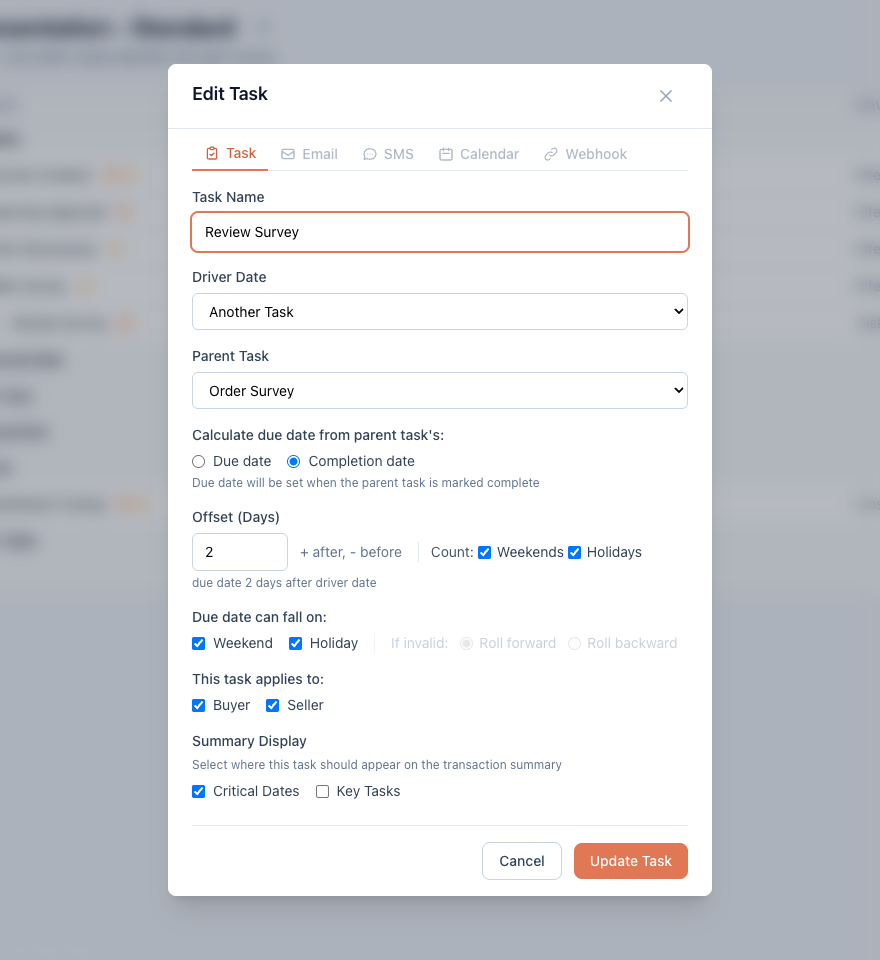
- In the task form, set Driver Date to Another Task.
- Pick the Parent Task.
- Choose Calculate due date from parent task’s: — Due date (fixed schedule relative to when the parent is supposed to happen) or Completion date (the clock starts only when the parent is actually marked complete).
- Set the Offset and weekend/holiday rules like any other task — see automatic due dates.
You can also add a child directly: Add Child Task on an existing task pre-wires the dependency (child tasks are always driven by their parent).
Why this beats fixed dates
Chains recalculate. If the parent’s date moves — because a contract date changed or an upstream parent moved — every task downstream recalculates in cascade, rules intact. A five-task sequence stays correctly spaced no matter how many times the anchor slips.
Good to know
- Due date children get dates immediately; Completion date children stay undated until the parent is completed.
- Child task sides must match their parent’s buyer/seller flags.
- If you accidentally create a loop (task A depends on B, which depends on A), the app flags the affected tasks and pauses their recalculation until you change a parent — dates won’t silently churn.